
How to Maintain a Portable Power Station
A portable power station is a working battery, and how it is stored, charged, and cleaned over its life has a measurable effect on how much usable capacity it still holds two, three, or five years after purchase. The good news is that the maintenance routine that actually matters is short. A handful of habits, practiced consistently, account for most of the difference between a unit that still delivers close to its rated capacity after years of ownership and one that has quietly lost a third of its runtime.
Quick Answer
The routine that protects a portable power station’s battery comes down to five habits:
- Store between 40% and 60% state of charge for anything longer than a few weeks; never store at 0% or leave it sitting at 100% for extended periods.
- Keep it between roughly 10°C and 25°C (50°F to 77°F) in storage, and never charge a cold unit below freezing.
- Check the charge level every 3 months during storage and top it back up if it has drifted low.
- Run a full discharge and recharge cycle every 3 to 6 months to keep the battery management system’s state-of-charge estimate accurate.
- Keep vents clear of dust, inspect cables and ports for damage or corrosion, and install firmware updates when the manufacturer releases them.
None of this is complicated. What it requires is consistency, because the damage from neglect accumulates slowly and is only obvious once a meaningful share of capacity is already gone. The sections below explain why each habit matters and what changes for a unit used for frequent home backup versus one that spends most of the year in a closet.
Why Maintenance Changes How Much Capacity Survives
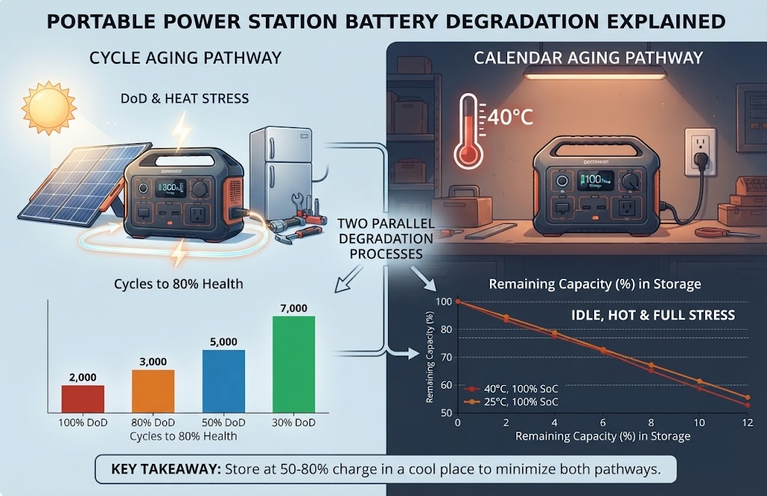
A portable power station’s battery loses capacity through two separate mechanisms that run in parallel. Cycle aging happens from actual use: every charge and discharge cycle causes a small amount of irreversible wear as lithium ions move in and out of the electrode material. Calendar aging happens even when the battery is never touched, purely as a function of time, temperature, and the voltage the cell is held at. A unit that sits in a garage for a year and is never plugged in has still aged, because the internal chemistry continues reacting slowly the entire time.
The mechanism behind most calendar aging is the growth of the solid electrolyte interphase (SEI), a thin passivation layer that forms on the anode surface. SEI growth is a slow side reaction between the electrode and the electrolyte, and its rate depends strongly on two things: temperature and the state of charge the cell is held at. A pseudo-two-dimensional degradation model of LiFePO4/graphite cells published in 2024 found SEI thickness exceeding 300 nanometers and a conductivity loss over 20% after 36 months of storage at 55°C and 90% state of charge (peer-reviewed P2D degradation study).
A separate 2025 study on LiFePO4/graphite pouch cells stored at high temperature found that cells aged at high state of charge consistently showed more severe capacity fade, greater lithium inventory loss, and worse interfacial degradation than cells stored at lower charge levels (Journal of Materials Chemistry A, 2025). Battery University’s summary of calendar aging in EV-format lithium cells reaches the same conclusion from long-duration testing: lower storage voltages and cooler temperatures both slow permanent capacity loss (Battery University, BU-1003a).
This is the technical basis for almost every maintenance recommendation that follows. Storage charge level and temperature are not arbitrary manufacturer caution; they change how fast a specific, measurable chemical process runs. A reader who wants the underlying explanation of how the battery, charge controller, and inverter work together inside these units can start with How Portable Power Stations Work, and the difference between rated and usable capacity is covered in detail in How to Calculate Battery Capacity for a Portable Power Station.
Storage: The Single Biggest Lifespan Factor
If only one habit on this list is followed, it should be this one. A portable power station that spends most of its life in storage, whether it is a camping unit used three times a year or a home backup unit that sits waiting for the next outage, ages primarily through calendar aging rather than cycling. That makes storage charge level and storage temperature the two variables with the most leverage over long-term capacity.
The correct storage charge range
The target is a middle state of charge, not empty and not full. Bluetti’s official user manual for the AC200P L states this directly: “If not used for more than 3 months, charge the unit to 40%-60% SoC and store it with the power off. For optimum battery life, discharge and charge the unit every 3 months” (Bluetti AC200P L User Manual).
This lands inside the wider range most manufacturers converge on, which runs from roughly 40% to 80% depending on brand and battery chemistry. A unit stored above roughly 80% for weeks at a time sees accelerated SEI growth for the reasons explained above; a unit left near 0% risks a different and more severe failure mode, covered next.
Chemistry makes a modest difference here. Most current portable power stations use lithium iron phosphate (LiFePO4, also written LFP) cells, which are more tolerant of full-charge and empty-charge extremes than the older nickel manganese cobalt (NMC) chemistry still found in some budget and older units. LFP cells still age faster at high state of charge, but the effect is less dramatic than with NMC, and LFP’s flatter voltage curve near full charge means the cell spends less time at genuinely high internal voltage even when the display reads close to 100%.
Neither chemistry benefits from being left at either extreme for months, so the 40% to 60% range remains the safer default regardless of which battery is inside the unit.
Why near-empty storage is worse than it looks
A lithium cell discharged well below its normal cutoff voltage does not simply lose a little capacity; it can suffer irreversible damage to the anode’s solid electrolyte interphase and, in extreme cases, copper dissolution from the current collector. A 2016 study on LiFePO4/graphite cells found that batteries over-discharged to 0.5V lost 12.56% of capacity irreversibly, and cells taken to 0.0V lost 24.88%, with further cycling afterward compounding the damage (over-discharge study, RSC Advances, 2016).
A portable power station’s battery management system is designed to cut off well before these voltages are reached during normal use, but a unit left completely unattended for many months can self-discharge past a safe threshold, particularly if it has an older, less efficient BMS or if a partial fault is already present. This is the practical reason manufacturers warn against long-term storage at 0%, and why Bluetti’s manual specifically instructs charging for at least 30 minutes before restarting a unit that has dropped to 0% SoC.
What the storage data actually shows
Independent testing gives a concrete sense of how much capacity is realistically at stake over a few months of ordinary storage, as opposed to worst-case laboratory conditions. Outdoor Life’s 2026 testing measured delivered energy at a steady 380W draw on five current power stations, first on a fresh charge and again after three months in storage, then reported the result as a percentage of each unit’s stated watt-hour rating.
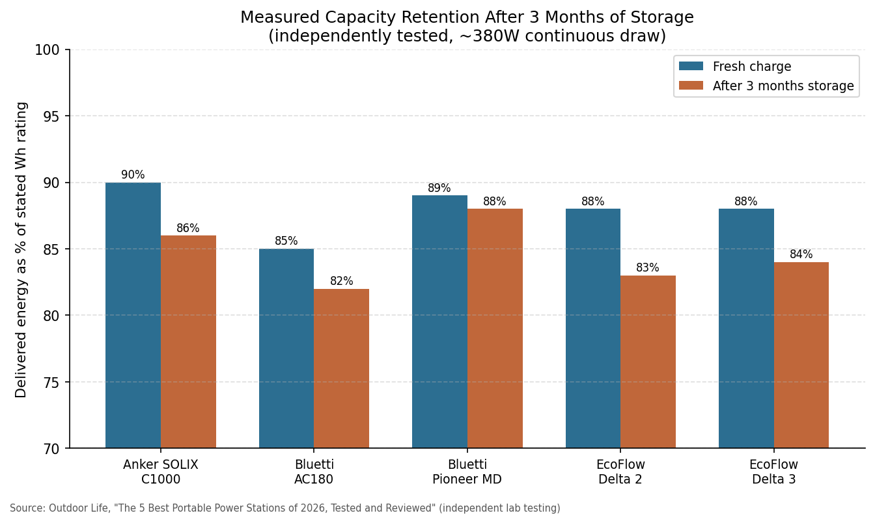
Figure 1. Measured energy delivered at ~380W draw, fresh versus after three months of ordinary storage. Even well-behaved units lose a few percentage points of already-below-rated capacity over a single storage season. Source: Outdoor Life, independent testing, 2026.
Two things stand out. First, none of these units delivered their full stated watt-hour rating even when freshly charged; that gap between nameplate and delivered capacity is a separate, normal characteristic of AC output and conversion losses, covered in How to Calculate Portable Power Station Runtime. Second, three months of storage cost each unit somewhere between one and five additional percentage points of delivered capacity, even under what appears to be reasonably normal storage conditions. That loss is small per season but compounds year over year, which is exactly why consistent storage habits matter more over a multi-year ownership period than any single storage decision.
Temperature Control During Storage and Use
Temperature interacts with state of charge rather than acting independently. The calendar aging studies cited above tested cells at 55°C specifically because heat sharply accelerates SEI growth and other side reactions at any given charge level; a cell held at 90% SoC and 55°C ages far faster than the same cell at 90% SoC and 20°C. In practice this means a power station stored at 60% charge in a hot attic or an enclosed vehicle in summer can age faster than one stored at 80% charge in a cool basement.
A practical storage temperature target is roughly 10°C to 25°C (50°F to 77°F), avoiding both prolonged heat exposure and freezing. Charging a lithium cell below freezing is a separate and more immediate hazard: at sub-zero temperatures, lithium plating can form on the anode during charging rather than the lithium properly intercalating into the graphite structure, which causes permanent capacity loss and, in some cases, creates conditions for an internal short circuit.
Most portable power station battery management systems block charging below a set temperature threshold specifically to prevent this, but a unit brought in from a cold vehicle or an unheated shed should be allowed to reach room temperature before it is plugged in, not charged immediately while still cold.
Charging Habits During Regular Use
Storage guidance covers a unit sitting idle. A unit in active rotation, whether for weekly camping trips, daily off-grid solar charging, or routine home backup top-ups, ages primarily through cycling rather than calendar time, and different habits apply.
- Avoid habitually running the battery down to 0% before recharging. The BMS prevents true over-discharge, but frequent deep cycling to the low cutoff still accelerates wear compared with recharging in the 10% to 20% range.
- Where the use case allows it, keeping day-to-day cycling within roughly a 20% to 80% depth of discharge extends cycle life meaningfully compared with routine full 0% to 100% cycles, though this is a preference rather than a strict rule, and full cycles are not damaging when they happen occasionally.
- Use the charger, cable, and solar input the manufacturer specifies. Third-party chargers with inaccurate voltage or current regulation are a common, avoidable cause of premature battery wear and, in rare cases, safety incidents.
- Do not block the ventilation intake or exhaust during charging. Heat generated while charging, particularly during fast AC charging above roughly 500W, is one of the more common causes of internal component stress, and the cooling fan needs clear airflow to do its job.
The emergency-readiness tradeoff
A unit kept for emergency backup is deliberately used differently from a unit kept for recreation, and the two goals pull against each other. A household that wants a power station ready at 100% at all times so it can respond instantly to a blackout is, by the calendar-aging evidence above, accepting a faster long-term capacity fade in exchange for readiness. A household willing to accept a short top-up delay before an outage can store at the lower, longevity-favoring charge range instead. Neither choice is wrong; it depends on how much warning a given household typically gets before an outage and how much capacity loss over several years is an acceptable tradeoff for always-ready power.
| Use case | Recommended storage charge | Recharge trigger |
| Occasional use (camping, travel, backup that is not time-critical) | 40% to 60% | Top up when checked every 3 months if below 30% |
| Frequent rotation (weekly solar top-ups, regular off-grid use) | Follow normal cycling; no special storage needed | Recharge as used, ideally before hitting 10-20% |
| Emergency-critical backup (medical equipment, no-warning outages) | 80% to 100%, accepting faster capacity fade | Keep near full; consider a second unit to rotate for longevity |
Periodic Recalibration Cycles
A battery management system estimates state of charge indirectly, using voltage curves and current tracking rather than measuring stored energy directly. Over months of partial charging and discharging, that estimate can drift, so the percentage shown on the display no longer matches the battery’s actual state. A full discharge to the low cutoff followed by a full charge back to 100%, done every 3 to 6 months, lets the BMS re-anchor its estimate against the two points on the voltage curve it can measure with confidence: fully charged and fully discharged.
This is the same practice Bluetti’s manual recommends for units in long-term storage, and it serves double duty as the periodic exercise that keeps the cell chemistry from settling too long at any one voltage.
Physical Care: Ports, Cables, and Ventilation
Battery chemistry gets the most attention, but a meaningful share of real-world portable power station failures and performance complaints trace back to simpler physical causes.
- Clean ventilation intakes and exhaust vents with a soft brush every 3 to 6 months under normal use, or monthly in dusty or sandy environments. Compressed air can drive debris deeper into the unit rather than out of it, so a brush or a vacuum on a low setting is the safer tool.
- Inspect AC, DC, USB-C, and solar input cables before each use for cracking, fraying, or bent pins, and replace damaged cables rather than continuing to use them.
- Check port covers and metal contacts for corrosion after outdoor or coastal use; a dry cotton swab removes light buildup, and closing port covers between uses prevents moisture and salt air from reaching the contacts in the first place.
- Wipe the exterior with a dry or barely damp cloth. Avoid solvents or abrasive cleaners on the casing or display.
Firmware and BMS Updates
Mid-range and higher-end portable power stations increasingly ship with companion apps and updatable firmware, and the battery management system is one of the most common things that firmware actually changes. Updates have shipped refinements to charge-curve algorithms, temperature cutoff behavior, state-of-charge calibration accuracy, and fan control logic, sometimes specifically fixing issues like a fan running constantly at low loads.
Because these updates govern exactly the charging and thermal behavior that determines long-term battery health, checking for them every few months is one of the highest-leverage and most overlooked items on this list. Most manufacturers recommend the unit be at 50% charge or higher and on a stable connection before starting an update, and the update should not be interrupted once it begins.
Common Maintenance Mistakes
| Mistake | Why it seems reasonable | Why it accelerates wear | Better practice |
| Storing at 100% “to be ready” | A full battery feels like maximum readiness | Holds the cell at its highest voltage for extended periods, accelerating SEI growth and permanent capacity fade | Store at 40-60% unless genuine no-warning readiness is required |
| Letting it sit at 0% after last use | Forgetting to recharge before putting it away | Risks over-discharge and BMS-level protective shutdown that can be difficult to recover from | Recharge to the storage range immediately, not “later” |
| Never checking a stored unit | Out of sight, out of mind between seasons | Self-discharge over many months can pull the battery below a safe level unnoticed | Check every 3 months; set a recurring reminder |
| Using an unapproved fast charger | A higher-wattage charger seems like a free upgrade | Poor voltage/current regulation stresses the cells and can trip protective circuitry repeatedly | Use the manufacturer’s charger or a verified compatible one |
| Ignoring firmware update prompts | The unit already works fine | Skips BMS and thermal-management improvements the manufacturer has already identified | Check the app every few months and apply updates at 50%+ charge |
Maintenance Schedule at a Glance
| Task | Frequency |
| Check stored unit’s charge level; top up if below ~30% | Every 3 months |
| Full discharge/recharge recalibration cycle | Every 3 to 6 months |
| Clean ventilation intakes and exhaust vents | Every 3 to 6 months (monthly in dusty environments) |
| Inspect cables and ports for damage or corrosion | Before each use |
| Check for and install firmware updates | Every 2 to 3 months |
| Wipe exterior casing and display | As needed |
Frequently Asked Questions
Is it safe to leave a portable power station plugged in all the time?
Most modern units include a UPS or pass-through mode that stops charging at 100% and only resumes once the level drops a few percentage points, which avoids continuous trickle charging at full voltage. This is generally considered safe for the electronics, but it still means the cell spends most of its time near full charge, which is the higher-wear end of the storage range discussed above. For a unit that genuinely needs to be instantly ready, this is a reasonable tradeoff. For a unit that does not need to be at 100% at every moment, storing it unplugged in the 40% to 60% range is the better choice for long-term capacity.
Does LiFePO4 need less maintenance than older lithium-ion batteries?
LiFePO4 cells are more chemically stable at charge extremes and typically rated for several times the cycle life of NMC cells, but they still benefit from the same core habits: moderate storage charge, temperature control, and periodic recalibration. “Lower maintenance” is a difference of degree, not a reason to skip the routine.
How much capacity will a well-maintained unit actually retain?
This depends on chemistry, cycle count, and storage conditions, and manufacturers typically rate LiFePO4 packs for thousands of cycles to a defined end-of-life capacity threshold. The measured data above shows that even short-term, ordinary storage produces a small but real capacity difference in a matter of months; consistent good habits over years are what separate a unit that still performs close to spec from one that has faded significantly, more than any single number can capture in isolation.
Conclusion
The routine that protects a portable power station’s battery is short enough to actually follow: store at a moderate charge rather than full or empty, keep it out of temperature extremes, check on it every few months, recalibrate periodically, and keep the vents, ports, and firmware in good order. None of these steps require technical expertise, and none of them are expensive. What they require is doing them consistently over years rather than treating maintenance as a one-time setup task. For sizing a new unit correctly or comparing capacity tiers, What Size Portable Power Station Do I Need? and 1000Wh Power Station: All You Need to Know cover the sizing and terminology side of the decision.
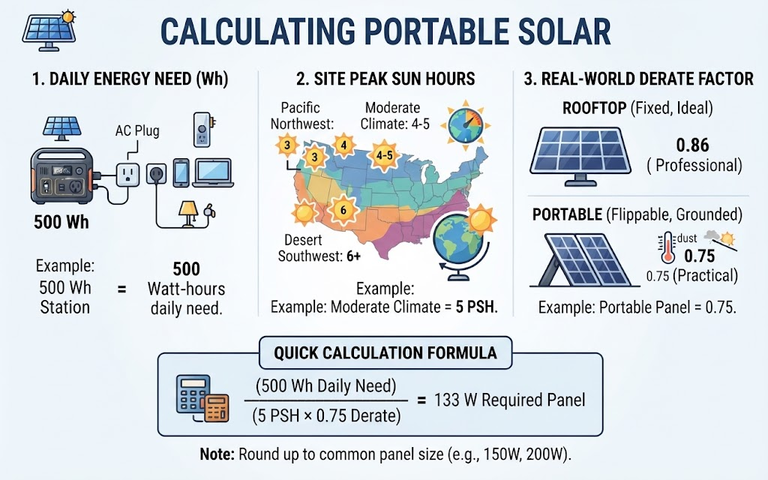

[…] with margin. Plan on 80% of nameplate energy at the end of the design life. See how to maintain a portable power station for routine […]