Portable Power Station AC vs. DC Output Explained
A portable power station rarely delivers power to a device in one straightforward step. Every AC outlet and every USB-C or 12V port pulls from the same battery, but the path the energy takes to reach the device is different, and that difference determines how long the battery actually lasts.
Quick Answer
AC output comes from the station’s internal inverter, which converts the battery’s stored direct current (DC) into alternating current (AC) that matches wall power. DC output (USB-A, USB-C, and 12V/car-style ports) sends the battery’s stored energy to the device with little or no conversion. Because AC output requires an inverter, it always loses more energy to heat than DC output does. On a typical compact power station, DC ports deliver roughly 10 to 20 percent more usable energy to a matching device than the same device would receive if it were powered through the AC inverter instead.
This matters in practice: a 12V cooler, a router, a laptop that supports USB-C charging, or a string of phones and tablets will usually run longer from a DC port than from an AC outlet, provided the device can accept the DC connection safely.
Why a Power Station Has Two Different Kinds of Output
The battery inside a portable power station stores energy as DC, typically at a nominal pack voltage in the 12V to 50V range depending on the model. For the fundamentals of how that battery, its inverter, and its output ports work together, see the Sielectronix guide to how portable power stations work. Every output on the unit has to get that DC energy to a device in the form the device expects.
AC outlets exist because most household appliances (TVs, refrigerators, microwaves, most laptop power bricks) are built to run on the alternating current that comes out of a wall socket, at 120V in North America or 230V in most of Europe, Africa, and Asia. To produce that waveform from a DC battery, the station uses an inverter: a set of switching transistors that chop the DC into a rapidly alternating signal and shape it into a clean sine wave. This is genuinely useful engineering, but it is not free. Every inverter draws some power just to operate, and it never converts 100 percent of the DC energy it receives into usable AC energy.
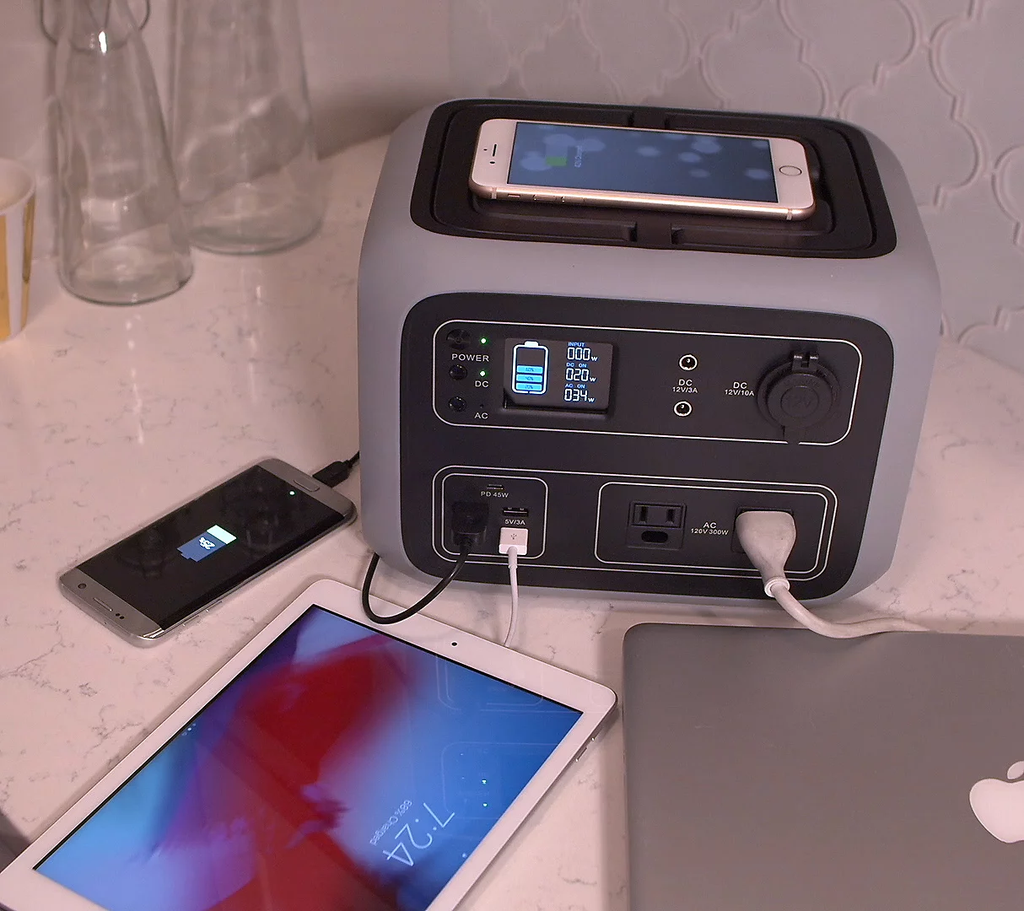
DC ports skip that step. USB-A, USB-C, and 12V/car-style outputs take energy from the battery, pass it through a much simpler DC-to-DC converter to regulate the voltage and current, and send it to the device. Because there is no need to synthesize an AC waveform, the conversion stage is smaller, simpler, and typically more efficient than a full inverter.
The Efficiency Difference, Explained With Numbers
Two figures drive this comparison for a typical compact lithium power station. Both are expressed in watts and watt-hours; for the distinction between the two units, see watts vs. watt-hours.
- Inverter efficiency: commonly 85 to 92 percent under moderate load. Sielectronix uses 85 percent as a conservative, realistic planning figure for compact units, consistent with the assumption used across other Sielectronix runtime guides.
- DC-to-DC conversion efficiency: commonly 90 to 97 percent for USB-C PD and 12V outputs. Sielectronix uses 95 percent as a representative planning figure.
There is also a fixed cost that AC output carries and DC output mostly avoids: the inverter’s own idle overhead. A running inverter continues to consume a small amount of power (commonly in the 5 to 15 watt range for compact units) simply to stay switched on and produce a clean waveform, regardless of how small the connected load is. Sielectronix uses 8 watts as the standard idle overhead assumption for compact units, matching the figure used elsewhere on this site.
Combined with the standard 90 percent usable depth of discharge assumption used across Sielectronix guides (see battery capacity for a portable power station for how that figure is derived), this gives two different usable-energy models:
AC Output Model
Energy delivered to an AC load per hour is approximately:
Battery draw (W) = (Load W ÷ 0.85) + 8 W idle overhead
Runtime (h) = (Rated Wh × 0.90) ÷ Battery draw (W)
DC Output Model
Energy delivered to a matching DC load has no inverter idle draw and a smaller conversion loss:
Runtime (h) = (Rated Wh × 0.90 × 0.95) ÷ Load (W)
Worked Example: A 1,000 Wh Power Station
The chart below applies both models to a 1,000 Wh rated power station running three common loads: a phone (10 W average), a CPAP machine (40 W average), and a laptop charging over USB-C or through the AC brick (60 W average). For the general runtime formula this example is built on, see how to calculate portable power station runtime.
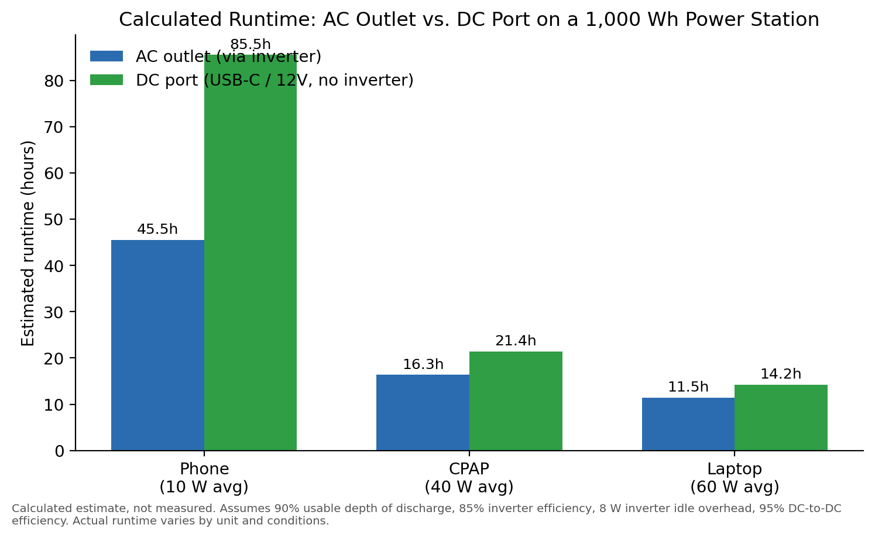
Figure 1. Calculated runtime for a 1,000 Wh power station under AC and DC output, for three representative loads. Values are calculated estimates, not laboratory measurements.
| Device (avg. load) | AC outlet runtime | DC port runtime | DC advantage |
| Phone (10 W) | 45.5 hours | 85.5 hours | +88% |
| CPAP (40 W) | 16.3 hours | 21.4 hours | +31% |
| Laptop (60 W) | 11.5 hours | 14.3 hours | +24% |
The DC advantage is largest for small loads. This is a direct consequence of the inverter’s fixed idle overhead: an 8 W idle draw is a small fraction of a 60 W laptop load but a very large fraction of a 10 W phone load. The lower the load, the more the AC path is penalized relative to DC.
Where the Energy Actually Goes
A different way to see the same effect is to track where a 1,000 Wh rated battery’s energy ends up, independent of any specific device.
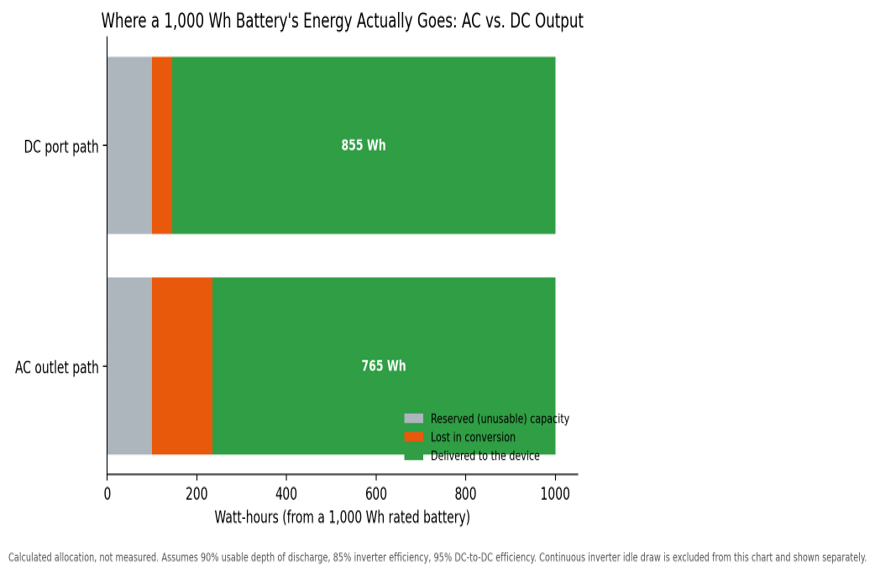
Figure 2. Allocation of a 1,000 Wh rated battery’s energy across reserved capacity, conversion losses, and energy actually delivered to the load, for the AC and DC paths. Continuous inverter idle draw is not included in this figure; it is treated separately because it depends on run time rather than a fixed share of stored energy.
Of the 900 Wh that is realistically usable after depth of discharge, the AC path delivers about 765 Wh to the load and loses about 135 Wh to inverter conversion. The DC path delivers about 855 Wh and loses about 45 Wh to DC-to-DC conversion. That 90 Wh gap, on top of the AC path’s continuous idle draw, is the entire explanation for why identical devices run longer from a DC port.
When AC Output Is Still the Right Choice
Efficiency is not the only consideration, and DC output is not always available for the device in question.
- The device has no DC option. A television, a countertop appliance, most desktop monitors, and many laptop power bricks are built for AC only. There is no DC shortcut available. A standard compressor refrigerator falls in this category too; see how long a portable power station can run a refrigerator for the AC-side calculation.
- The device draws more power than the DC ports can supply. USB-C Power Delivery, as defined by the USB Implementers Forum, tops out at 100 W under PD 3.0 and up to 240 W under the newer PD 3.1 extension, though most compact power stations implement the lower limit. 12V car-style ports are usually limited to roughly 120 to 180 W. Higher-power tools and appliances have to use the AC outlet regardless of efficiency. For the distinction between a device’s brief startup draw and what it needs to run continuously, see continuous power vs. surge power.
- Multiple devices need to share one port. A power strip on the AC outlet is often more practical than juggling several DC adapters, even though it is less efficient.
- The DC connector or voltage does not match. A device built for a different DC voltage or a different barrel-connector size should not be forced onto a mismatched port. When in doubt, the AC path, through the device’s own official charger, is the safer choice.
Common Mistakes
Assuming every USB-C port delivers the same power
USB-C describes a connector shape, not a guaranteed power level. The actual power depends on the port’s USB Power Delivery (PD) rating, the cable’s rating, and what the connected device requests. A laptop that needs 100 W will not charge at full speed from a port or cable rated for less, even though the plug fits. A low-draw device such as a Wi-Fi router has the opposite problem in mind: it rarely needs the DC port’s full rating at all, which is exactly why the DC path is so efficient for it. See how long a portable power station can run a router for a worked runtime example.
Ignoring inverter idle draw for light loads
Because idle overhead is roughly fixed, running a phone or a small radio from the AC outlet for an extended period wastes a disproportionate share of the battery on simply keeping the inverter switched on. For light loads, a DC port is almost always the better choice when the device supports it.
Connecting a DC device without checking voltage, current, connector size, and polarity
A barrel-style DC plug can physically fit a port while delivering the wrong voltage or reversed polarity. All four details, voltage, current rating, connector dimensions, and polarity, need to match before connecting a DC accessory that did not ship with the power station.
Treating AC and DC port limits as unrelated to each other
Most power stations allow simultaneous AC and DC use, but the combined load has to remain within both the individual port ratings and the unit’s overall output limit. Running the inverter at or near its maximum while also drawing heavily from DC ports can trip an overload protection, even if each port looks acceptable in isolation.
Frequently Asked Questions
Does charging a laptop over USB-C really save meaningful battery capacity compared to the AC brick?
Yes, when the laptop supports USB-C PD charging at a wattage the port can deliver. In the worked example above, a 60 W laptop load runs about 24 percent longer from a compatible DC port than from the AC outlet on the same battery.
Why does my power station feel warm even when nothing seems to be running?
If the AC inverter is switched on, it draws idle power and generates heat even with no plugged-in load. Switching the inverter off when only DC devices are in use reduces both wasted energy and heat.
Can I run a small refrigerator on a DC port instead of AC?
Only if the refrigerator is specifically a 12V DC unit. A standard AC compressor refrigerator has to run through the inverter; there is no way to route it through a USB or 12V port.
Is a higher-wattage USB-C PD port always faster?
Only up to the point the connected device and cable can accept. A 140 W PD port charges a 45 W laptop no faster than a 65 W PD port would, because the negotiated power is limited by the device, not just the port.
The Bottom Line
AC and DC output on a portable power station are not interchangeable conveniences; they represent two different energy paths with meaningfully different losses. For any device that genuinely supports it, whether that is a phone, a router, a CPAP machine, or a USB-C laptop, drawing power through a DC port instead of the AC inverter typically adds meaningful extra runtime on the same battery. The AC outlet remains necessary for AC-only appliances, higher-power loads, and situations where several devices need to share a single connection, but it should not be the default choice for a device that can just as easily plug into a DC port.
For guidance on matching total capacity to an entire household load rather than a single device, see what size portable power station you need, and for how a portable power station’s AC and DC paths compare with a dedicated UPS, see portable power station vs. UPS.